Introduction
The iPhone 17 Pro introduces a premium 6.3-inch display and an advanced camera system designed for photography, video recording, gaming, and everyday productivity. As smartphones continue to play a central role in work and personal life, protecting both the display and the camera lenses has become an important consideration for many users.
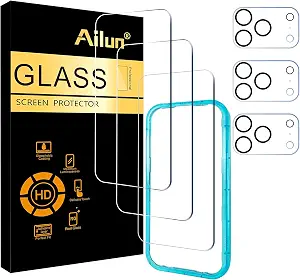
The Ailun Screen Protector + Camera Lens Protector for iPhone 17 Pro (3+3 Pack) is designed to provide protection for two of the phone’s most exposed components: the front display and the rear camera lenses. The package includes three tempered glass screen protectors, three camera lens protectors, and an installation frame intended to simplify the application process.
Rather than changing how the phone functions, these accessories are intended to help reduce the effects of everyday wear, including scratches, minor impacts, fingerprints, and surface abrasions. Features such as tempered glass construction, Dynamic Island compatibility, sensor protection, case-friendly sizing, and installation assistance aim to preserve the original user experience while adding an additional layer of protection.
This article explains the product’s features, discusses how it can be used in daily life, compares general categories of screen protection, and highlights important considerations before installation. The goal is to provide practical, balanced information for anyone considering accessories for the iPhone 17 Pro.
Why Protect Both the Display and Camera?
Modern smartphones rely heavily on two components:
- The display, which is used for nearly every interaction.
- The camera system, which captures photos and videos for both personal and professional use.
Although manufacturers continue improving glass durability, no smartphone is completely immune to scratches or accidental damage.
Common situations that may affect either the display or camera include:
- Carrying the phone alongside keys or coins
- Placing the device on rough surfaces
- Everyday transportation in backpacks or handbags
- Minor accidental drops
- Dust, sand, or other abrasive particles
Using dedicated protectors for both the screen and camera lenses can help minimize everyday wear while preserving the original surfaces underneath.
It’s important to recognize that tempered glass accessories are designed as an additional protective layer and should not be viewed as a guarantee against every type of impact or damage.
Product Overview
The Ailun protection kit is specifically designed for the iPhone 17 Pro (6.3-inch).
The package includes:
- Three tempered glass screen protectors
- Three tempered glass camera lens protectors
- Installation frame
- Cleaning and installation accessories
Having multiple protectors in one package allows users to replace worn protectors over time or keep extras available if needed.
Key Features
Tempered Glass Screen Protection
The front screen protector uses tempered glass designed to provide resistance against common everyday scratches and surface wear.
Its purpose is to create a protective layer between the phone’s original display and everyday hazards.
Typical examples include:
- Pocket debris
- Keys
- Coins
- Dust particles
- Desk surfaces
The protector is intended to wear over time before the phone’s original display does.
Camera Lens Protection
One of the distinguishing aspects of this package is the inclusion of separate camera lens protectors.
Modern smartphone cameras contain multiple exposed lenses that can come into contact with hard surfaces during everyday use.
Camera lens protectors are intended to help reduce:
- Surface scratches
- Minor abrasions
- Everyday handling marks
Helping maintain clean lens surfaces may contribute to preserving image quality by reducing visible damage to the exterior lens covers.
Dynamic Island Compatibility
The screen protector is designed with compatibility for the iPhone 17 Pro’s Dynamic Island interface.
Proper design around this area helps maintain access to interactive notifications and system features without unnecessary obstruction.
Sensor Protection
The product also references sensor protection as part of its design.
Modern smartphones rely on front-facing sensors for features such as:
- Face authentication
- Ambient light detection
- Proximity sensing
A properly designed screen protector aims to accommodate these components while allowing them to function as intended under normal conditions.
HD Transparency
Display clarity is one of the most important characteristics of any screen protector.
The tempered glass is designed to maintain:
- Sharp text
- Natural color reproduction
- Brightness
- Display contrast
- Video clarity
This allows users to continue enjoying the visual quality of the iPhone 17 Pro display while adding an additional protective layer.
Responsive Touch Performance
Touch responsiveness is essential for daily smartphone use.
The protector is designed to support activities such as:
- Typing
- Gaming
- Scrolling
- Drawing
- Multi-touch gestures
- App navigation
When installed correctly, users can generally continue interacting with the display naturally.
Case-Friendly Design
Many smartphone owners prefer using both a protective case and a screen protector.
A case-friendly design generally means the protector is sized to leave appropriate clearance around the display edges, helping reduce the chance of interference with compatible cases.
Compatibility can still vary depending on the design of individual cases, especially unusually thick or rugged models.
Installation Frame
Accurate alignment is one of the most challenging aspects of installing a screen protector.
The included installation frame is intended to help position the tempered glass more accurately before application.
Benefits of an alignment frame may include:
- Easier positioning
- Reduced chance of uneven placement
- More consistent installation
Careful preparation remains important for achieving the best results.
Everyday Uses
Daily Commuting
Whether commuting by car, train, bus, or bicycle, smartphones are frequently handled throughout the day.
A screen protector and camera lens protector provide additional protection during repeated daily use.
Professional Work
Many professionals rely on smartphones for:
- Video conferencing
- Scheduling
- Document review
- Messaging
Frequent use naturally increases opportunities for fingerprints, scratches, and surface wear.
Students
Students often carry their phones together with notebooks, chargers, pens, and textbooks.
Protective accessories can help reduce direct contact between these objects and the phone’s glass surfaces.
Photography
The iPhone 17 Pro camera system is designed for high-quality photography and video recording.
Keeping the exterior lens surfaces protected from everyday scratches may help preserve clear image capture over time.
Content Creation
Content creators frequently use their phones for:
- Recording videos
- Taking product photos
- Editing content
- Social media creation
Protecting both the display and camera helps support these activities during regular use.
Travel
Travel often exposes smartphones to:
- Airport security bins
- Hotel desks
- Outdoor environments
- Navigation use
- Frequent handling
Protective accessories can help prepare devices for these situations.
How to Install the Protectors
Proper installation has a significant impact on the final appearance and performance.
Step 1: Clean the Display
Use the supplied cleaning materials to remove:
- Dust
- Fingerprints
- Oils
- Smudges
Even very small dust particles may become visible beneath tempered glass.
Step 2: Prepare the Camera Area
Before applying camera lens protectors, ensure the camera housing is completely clean.
Avoid leaving dust or lint around the lens edges.
Step 3: Use the Installation Frame
Position the installation frame according to the included instructions.
The frame helps align the screen protector before lowering it onto the display.
Step 4: Apply Gentle Pressure
After placement, gently press near the center.
The adhesive layer typically spreads naturally across the screen.
If small air bubbles remain due to trapped air, they may gradually disappear. Bubbles caused by dust generally require removing the debris before reinstalling.
Who May Find This Product Suitable?
This protection kit may be suitable for various types of users.
Everyday Smartphone Users
People looking to help preserve the appearance of their iPhone 17 Pro during routine use.
Students
Users carrying their devices between classes, libraries, and campuses.
Professionals
Individuals who depend heavily on their phones throughout the workday.
Travelers
Those who frequently carry smartphones through airports, hotels, and public transportation.
Mobile Photographers
Users who regularly take photos and videos and wish to help protect the exterior camera lenses.
Mobile Gamers
Those seeking additional screen protection while maintaining touch responsiveness.
Important Things to Consider
Before installing any screen or camera protector, there are several practical points to remember.
Verify Device Compatibility
This kit is intended specifically for the iPhone 17 Pro (6.3-inch).
It may not fit:
- iPhone 17
- iPhone 17 Air
- iPhone 17 Pro Max
- Earlier iPhone generations
Always confirm the phone model before installation.
Proper Installation Is Important
Most installation issues result from:
- Dust contamination
- Misalignment
- Rushing the process
Working carefully in a clean environment often produces better results.
Protectors Are Consumable Accessories
Tempered glass protectors are designed to absorb everyday wear.
Over time they may develop:
- Scratches
- Chips
- Cracks
Replacing the protector periodically helps maintain both appearance and protection.
Camera Protectors Should Remain Clean
Regularly wiping the camera protectors with a microfiber cloth can help maintain clear photography by removing fingerprints and smudges.
Comparing General Types of Screen Protection
Choosing a screen protector often involves understanding the strengths of different materials.
Tempered Glass
Advantages:
- Glass-like feel
- Good scratch resistance
- High transparency
- Comfortable touch experience
Considerations:
- Can crack after strong impacts
- Slightly thicker than film protectors
PET Film
Advantages:
- Thin
- Flexible
- Lightweight
Considerations:
- Lower scratch resistance
- Different touch feel
- Generally offers less impact protection than tempered glass
TPU Film
Advantages:
- Flexible construction
- Can absorb some minor impacts
- Suitable for certain curved displays
Considerations:
- Softer surface
- May show marks more easily
- Different texture compared with glass
Privacy Screen Protectors
Advantages:
- Reduces visibility from side viewing angles
- Adds privacy in public places
Considerations:
- Can reduce overall brightness
- Narrower viewing angles
The Ailun model discussed here focuses on maintaining clear visibility rather than incorporating a privacy filter.
Tips for Long-Term Care
To help extend the lifespan of both the screen and camera protectors:
- Clean regularly with a microfiber cloth.
- Avoid placing the phone with sharp objects.
- Replace cracked protectors promptly.
- Use a compatible protective case.
- Avoid unnecessary pressure during cleaning.
- Inspect camera protectors periodically for chips or heavy scratches.
Small maintenance habits can help keep the phone looking its best over time.
Frequently Asked Questions
Does this protector fit every iPhone 17 model?
No. It is designed specifically for the iPhone 17 Pro (6.3-inch).
Does the package include camera protection?
Yes. The kit includes three separate tempered glass camera lens protectors in addition to the three screen protectors.
Can the screen protector work with Dynamic Island?
The protector is designed to be compatible with the iPhone 17 Pro’s Dynamic Island layout.
Will Face ID and front sensors continue working?
The protector is designed with compatibility for the phone’s front sensors, provided it is installed correctly and remains clean.
Is a phone case still recommended?
Many users choose to combine a screen protector with a compatible protective case since each accessory serves a different protective purpose.
Why are three protectors included?
Having multiple protectors allows for future replacements if one becomes worn, scratched, or damaged during everyday use.
Can scratches on the protector affect the original screen?
Scratches that appear on the tempered glass protector generally affect the protector itself rather than the phone’s original display beneath it.
Do camera lens protectors affect photo quality?
They are designed to protect the exterior lenses while maintaining image clarity under normal conditions. Keeping the protectors clean and properly installed can help preserve photo and video performance.
Conclusion
The Ailun Screen Protector + Camera Lens Protector for iPhone 17 Pro (3+3 Pack) is designed to provide comprehensive protection for two of the smartphone’s most frequently exposed components: the display and the camera lenses. With tempered glass construction, Dynamic Island compatibility, sensor-friendly design, a case-friendly fit, and an installation frame, it aims to balance everyday protection with the original look and feel of the device.
While no screen protector or camera lens protector can eliminate every risk associated with accidental drops or impacts, adding these accessories can help reduce the effects of routine scratches and daily wear. Combined with careful handling and a compatible protective case, they can contribute to maintaining the appearance of the iPhone 17 Pro over time.
When choosing any protective accessory, it’s helpful to consider compatibility, installation quality, and your own usage habits. Taking the time to install the protectors correctly and replacing them when they become worn can help you continue enjoying your device’s display and camera performance for longer.